
Microsoft Clipchamp
Pro-level video editing made accessible through AI-driven automation and Microsoft 365 integration.


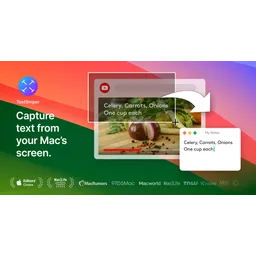
TextSniper is a macOS application designed for quickly extracting text from images, PDFs, videos, and other digital documents. Utilizing advanced Optical Character Recognition (OCR) technology, it allows users to capture a selected screen area, instantly recognize the text within, and copy it to the clipboard. The architecture involves efficient algorithms optimized for speed and accuracy, ensuring minimal latency during text extraction. The value proposition lies in its ability to convert non-selectable text into editable text, saving time and effort for users who need to repurpose content from various sources. Use cases include extracting text from YouTube videos, online courses, presentations, and even scanned documents. It also features QR code and barcode recognition. Integration is seamless, operating from the menu bar for quick access, and customizable shortcuts.
TextSniper is a macOS application designed for quickly extracting text from images, PDFs, videos, and other digital documents.
Explore all tools that specialize in extract text from images. This domain focus ensures TextSniper delivers optimized results for this specific requirement.
Explore all tools that specialize in convert text to speech. This domain focus ensures TextSniper delivers optimized results for this specific requirement.
Explore all tools that specialize in optical character recognition. This domain focus ensures TextSniper delivers optimized results for this specific requirement.
Allows the application to read extracted text aloud, leveraging macOS's built-in text-to-speech capabilities.
Automatically detects and converts QR codes and barcodes into text.
Users can define their own keyboard shortcut to quickly activate TextSniper.
Operates from the macOS menu bar, providing quick access without cluttering the dock.
Supports multiple languages depending on the macOS version, ensuring accurate text recognition across different languages.
Extracted text is automatically copied to the clipboard for easy pasting into other applications.
Download the TextSniper application from the Mac App Store or the official website.
Install the application by dragging it to the Applications folder.
Launch TextSniper, which will appear in the menu bar.
Grant TextSniper the necessary permissions in System Preferences (Screen Recording, Accessibility).
Use the default shortcut (CMD+Shift+2) or customize it in the settings to activate the text capture mode.
Select the area on the screen containing the text you want to extract.
The extracted text is automatically copied to your clipboard.
Paste the text into your desired application.
All Set
Ready to go
Verified feedback from other users.
"Users praise TextSniper for its speed, accuracy, and ease of use, highlighting its value for productivity and accessibility."
Post questions, share tips, and help other users.

Pro-level video editing made accessible through AI-driven automation and Microsoft 365 integration.

The #1 platform for making high quality AI covers in seconds!

Professional-Grade Neural Text-to-Speech with Hyper-Realistic Emotional Inflection

AI-powered machine translation service offering end-to-end image translation and text translation capabilities.

Transform scripts into professional 2D animated videos instantly with AI-powered scene matching.

Your Voice AI Assistant that reads, writes, listens, and gets answers.